
Notice
Recent Posts
Recent Comments
Link
| 일 | 월 | 화 | 수 | 목 | 금 | 토 |
|---|---|---|---|---|---|---|
| 1 | 2 | 3 | 4 | |||
| 5 | 6 | 7 | 8 | 9 | 10 | 11 |
| 12 | 13 | 14 | 15 | 16 | 17 | 18 |
| 19 | 20 | 21 | 22 | 23 | 24 | 25 |
| 26 | 27 | 28 | 29 | 30 | 31 |
Tags
- 반복문
- server engineer
- object 클래스 # java
- java #예외처리 #throw #throws
- java #추상클래스
- 브루트 포스법
- Next.js
- 주니어 백엔드 개발자
- 백엔드 개발자 로드맵
- tibero 7.23
- 자바 #자바문법 #자바기초 #참조형 #기본형
- 올 겨울은 조금 따뜻할 것 같다.
- 나는야 4학년 #5학년 까지 가보자구
- software enginner
- server developer
- 2798블랙잭
- 정보처리기사 실기 #정처기 실기 #2024년 2회 #정처기 2024년 2회 #공부법 # 꿀팁
- 넥슨개발자컨퍼런스
- 25304번
- tmax tibero
- Spring
- 서버 엔지니어
- ndc2025
- static #자바 메모리 구조 #멤버 변수
- heap area #stack area #static area #jvm
- 이분탐색
- 서버 개발자
- 2026 하반기 대기업 반드시 갑니다
- level2
- level3
Archives
- Today
- Total
개발자 쿠키
[CI/CD] Github Actions, Jenkins, ArgoCD로 CICD 파이프라인 구축 본문
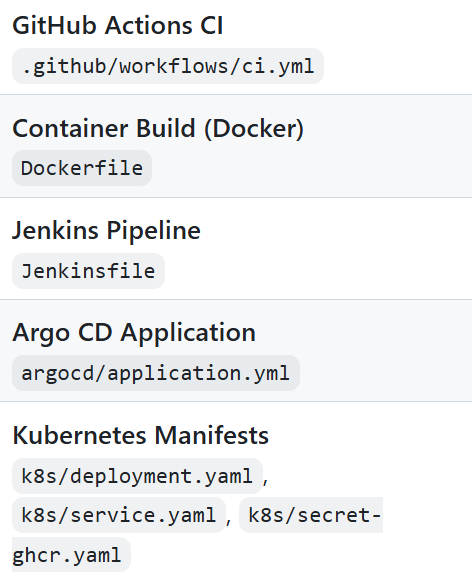
시퀀스 다이어그램
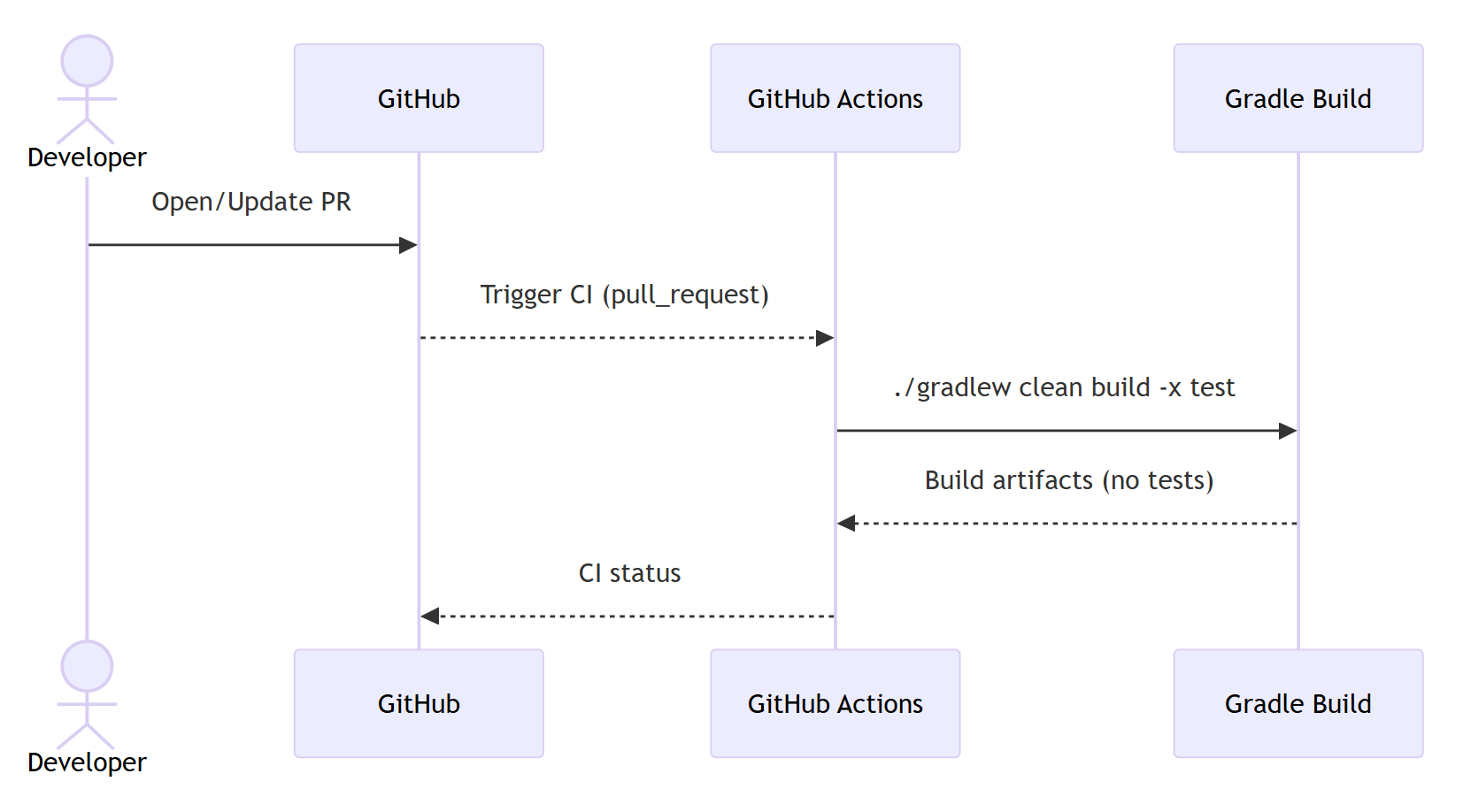
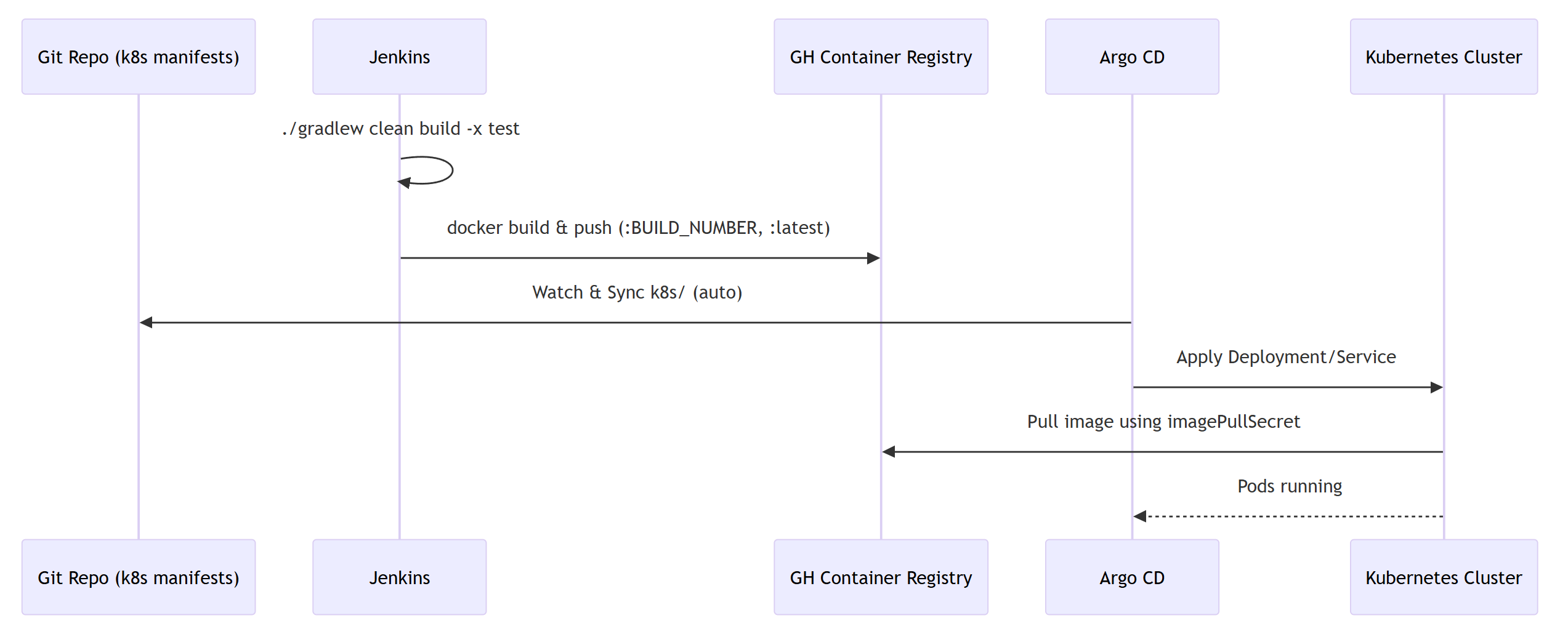
GitHub Actions로 PR 빌드/검증 → Jenkins로 빌드, 이미지 푸시 → ArgoCD로 K8s 배포
1. Jenkins로 이미지 GHCR에 push
Jenkinsfile
pipeline {
	agent any

  options {
	// 로그 타임스탬프, 워크스페이스 정리 등 선택 사항
    timestamps()
    skipDefaultCheckout(true)
  }

  environment {
    // ---- 이미지/레지스트리 설정 ----
    REGISTRY = 'ghcr.io'
    OWNER    = 'quoteline'            // 깃허브 ORG/USER (반드시 소문자)
    REPO     = 'quoteline'            // 이미지 이름 (소문자)
    IMAGE    = "${REGISTRY}/${OWNER}/${REPO}:${env.BUILD_NUMBER}"
    LATEST   = "${REGISTRY}/${OWNER}/${REPO}:latest"

    // Jenkins 자격증명 ID (아래 2단계에서 만듭니다)
    // - GitHub PAT로 GHCR 로그인 (Username with password)
    REGISTRY_CREDENTIALS = credentials('registry-creds')

    // 선택: 도커 빌드킷
    DOCKER_BUILDKIT = '1'
  }

  stages {
		stage('Checkout') {
			steps {
	    // SCM(현재 브랜치) 체크아웃
        checkout scm
      }
    }

    stage('Build') {
			steps {
				sh 'chmod +x ./gradlew'
        sh './gradlew clean build -x test'
      }
    }

    stage('Docker Build') {
			steps {
        sh 'docker build -t ${IMAGE} -t ${LATEST} .'
      }
    }

    stage('Docker Push') {
      //when { branch 'main' }
      environment { GH_PAT = credentials('github-token') }
      steps {
		// GHCR 로그인 후 푸시
        sh 'echo ${REGISTRY_CREDENTIALS_PSW} | docker login ${REGISTRY} -u ${REGISTRY_CREDENTIALS_USR} --password-stdin'
        sh 'docker push ${IMAGE}'
        sh 'docker push ${LATEST}'
      }
    }
  }

  post {
		always {
	  // 로그인 세션 정리 (실패해도 무시)
      sh 'docker logout ${REGISTRY} || true'
    }
  }
}
Jenkins로 빌드 자동화 자세한 내용
https://cookie.tistory.com/152
Jenkins로 Build 자동화 설정
1. 프로젝트 위치 이동cd C:\Users\1stev\IdeaProjects\QuoteLine 2. Jenkins 컨테이너 실행mkdir jenkins_homedocker run --name jenkins -d -p 8080:8080 -p 50000:50000 ` -v ${PWD}\jenkins_home:/var/jenkins_home ` -u root jenkins/jenkins:lts-jdk17 3.
cookie.tistory.com
2. Github Actions Jenkins가 보낸 태그로 k8s manifest의 이미지 태그 업데이트
.github/worksflow/ci.yml
name: PR CI

on:
  pull_request:
    branches: [ main, develop, feat/** ]
  push:
    branches: [ main, develop, feat/** ]

jobs:
  build:
    runs-on: ubuntu-latest
    steps:
      - uses: actions/checkout@v4
      - name: Set up JDK
        uses: actions/setup-java@v4
        with:
          distribution: temurin
          java-version: '17'
      - name: Cache Gradle
        uses: actions/cache@v4
        with:
          path: |
            ~/.gradle/caches
            ~/.gradle/wrapper
          key: ${{ runner.os }}-gradle-${{ hashFiles('**/*.gradle*', '**/gradle-wrapper.properties') }}
          restore-keys: ${{ runner.os }}-gradle-
      - name: Build (no test or with test)
        run: |
          chmod +x ./gradlew
          ./gradlew clean build -x test
3. Argo CD
3-1. Namespace 생성
kubectl create namespace quoteline-dev
3-2. ArgoCD 설치 및 UI 접속
# ArgoCD 설치 (namespace: argocd)
kubectl create namespace argocd
kubectl apply -n argocd -f https://raw.githubusercontent.com/argoproj/argo-cd/stable/manifests/install.yaml

# ArgoCD 서비스 포트 포워딩
kubectl port-forward svc/argocd-server -n argocd 8080:443

# 비밀번호 찾는 방법
kubectl -n argocd get secret argocd-initial-admin-secret \
  -o jsonpath="{.data.password}" | base64 -d; echo
3-3. GitOps 파이프라인 준비
- ArgoCD에서 Application 생성
- Github Repo 연결
argocd app create quoteline-server \
  --repo https://github.com/사용자명/QuoteLine.git \
  --path k8s \
  --dest-server https://kubernetes.default.svc \
  --dest-namespace quoteline-dev
'k8s' 카테고리의 다른 글
| [인프런] 비전공자도 이해할 수 있는 쿠버네티스 입문/실전 - 박재성 수강 후기 (0) | 2026.06.11 |
|---|---|
| [k8s] Next.js를 pod로 띄우기 (0) | 2025.06.08 |
| [k8s] SpringBoot 서버를 pod로 띄우기 (3) | 2025.06.08 |
| [k8s] Nginx로 pod 띄우기 (1) | 2025.06.07 |
| [k8s] window에서 Kubernetes 설치하기 (docker desktop) (1) | 2025.06.07 |
'k8s' Related Articles
more


