

Notice
Recent Posts
Recent Comments
Link
| 일 | 월 | 화 | 수 | 목 | 금 | 토 |
|---|---|---|---|---|---|---|
| 1 | ||||||
| 2 | 3 | 4 | 5 | 6 | 7 | 8 |
| 9 | 10 | 11 | 12 | 13 | 14 | 15 |
| 16 | 17 | 18 | 19 | 20 | 21 | 22 |
| 23 | 24 | 25 | 26 | 27 | 28 | 29 |
| 30 | 31 |
Tags
- 이분탐색
- object 클래스 # java
- 정보처리기사 실기 #정처기 실기 #2024년 2회 #정처기 2024년 2회 #공부법 # 꿀팁
- 넥슨개발자컨퍼런스
- 서버 개발자
- static #자바 메모리 구조 #멤버 변수
- 25304번
- ndc2025
- 주니어 백엔드 개발자
- 서버 엔지니어
- 나는야 4학년 #5학년 까지 가보자구
- tibero 7.23
- 2026 하반기 대기업 반드시 갑니다
- java #추상클래스
- java #예외처리 #throw #throws
- server engineer
- software enginner
- Spring
- 자바 #자바문법 #자바기초 #참조형 #기본형
- server developer
- heap area #stack area #static area #jvm
- Next.js
- 백엔드 개발자 로드맵
- AWS
- 반복문
- aws SAA-c03
- level2
- level3
- 올 겨울은 조금 따뜻할 것 같다.
- tmax tibero
Archives
- Today
- Total
개발자 쿠키
Spring -[컴포넌트 스캔] #6 본문
김영한 - 스프링 핵심 원리 기본편을 듣고 정리한 내용입니다.
스프링 핵심 원리 - 기본편 - 인프런 | 강의
스프링 입문자가 예제를 만들어가면서 스프링의 핵심 원리를 이해하고, 스프링 기본기를 확실히 다질 수 있습니다., - 강의 소개 | 인프런...
www.inflearn.com
📝목차
6. 컴포넌트 스캔
- 컴포넌트 스캔과 의존관계 자동 주입 시작하기
- 탐색 위치와 기본 스캔 대상
- 필터
- 중복 등록과 충돌
📌컴포넌트 스캔과 의존관계 자동 주입 시작하기
- 스프링빈 등록: @Bean, XML의 <bean> 등을 통해 설정 정보에 등록한 스프링 빈을 나열
- 설정 정보가 없어도 자동으로 스프링 빈을 등록하는 컴포넌트 스캔이라는 기능을 제공한다.
💡AutoAppConfig.java
package hello.core;
import org.springframework.context.annotation.ComponentScan;
import org.springframework.context.annotation.Configuration;
import org.springframework.context.annotation.FilterType;
import static org.springframework.context.annotation.ComponentScan.*;

@Configuration
@ComponentScan(

 		excludeFilters = @Filter(type = FilterType.ANNOTATION, classes =
Configuration.class))
public class AutoAppConfig {

}- @Bean으로 등록한 클래스가 없음
참고: 컴포넌트 스캔을 사용하면 @Configuration이 붙은 설정 정보도 자동으로 등록되기 때문에, AppConfig, TestConfig 등 앞서 만들어 두었던 설정 정보도 함께 등록되고, 실행되어 버린다. 그래서 excludeFilters를 이용해서 설정정보는 컴포넌트 스캔 대상에서 제외했다. 보통 설정 정보를 컴포넌트 스캔 대상에서 제외하지 않지만, 기존 예제 코드를 최대한 남기고 유지하기 위해서 이 방법을 선택했다.
- 컴포넌트 스캔은 @Component 애노테이션이 붙은 클래스를 스캔해서 스프링 빈으로 등록한다.
💡MemoryMemberRepository @Component 추가 (컴포넌트 스캔의 대상이 됨)
@Component
public class MemoryMemberRepository implements MemberRepository {}💡RateDiscountPolicy @Component 추가
@Component
public class RateDiscountPolicy implements DiscountPolicy {}💡MemberServiceImpl @Component, @Autowired 추가
@Component
public class MemberServiceImpl implements MemberService {

    private final MemberRepository memberRepository;

    @Autowired
 	public MemberServiceImpl(MemberRepository memberRepository) {
 		this.memberRepository = memberRepository;
 	}
}- AppConfig에서 @Bean으로 직접 설정 정보를 작성했고, 의존관계도 직접 명시했다. 이제 설정 정보 자체가 없어 의존관계 주입도 클래스 안에서 해결해야함.
- @Autowired는 의존관계를 자동으로 주입해준다.
💡OrderServiceImpl @Component, @Autowired 추가
@Component
public class OrderServiceImpl implements OrderService {

 	private final MemberRepository memberRepository;
 	private final DiscountPolicy discountPolicy;

 	@Autowired
 	public OrderServiceImpl(MemberRepository memberRepository, DiscountPolicy
discountPolicy) {

 		this.memberRepository = memberRepository;
 		this.discountPolicy = discountPolicy;
 	}
}- @Autowired를 사용하면 생성자에서 여러 의존관계도 한번에 주입받을 수 있다.
💡AutoAppConfigTest.java
package hello.core.scan;
import hello.core.AutoAppConfig;
import hello.core.member.MemberService;
import org.junit.jupiter.api.Test;
import org.springframework.context.ApplicationContext;
import
org.springframework.context.annotation.AnnotationConfigApplicationContext;

import static org.assertj.core.api.Assertions.*;

public class AutoAppConfigTest {

 	@Test
 	void basicScan() {
 		ApplicationContext ac = new
AnnotationConfigApplicationContext(AutoAppConfig.class);
 		MemberService memberService = ac.getBean(MemberService.class);
 		assertThat(memberService).isInstanceOf(MemberService.class);
 	}
}- AnnotationConfigApplicationContext를 사용하는 것은 기존과 동일
- 설정 정보를 AutoAppConfig 클래스를 넘겨준다.
- 실행하면 기존과 같이 잘 동작함
💡컴포넌트 스캔과 자동 의존관계 주입이 어떻게 동작하는지
1.@ComponentScan

- @ComponentScan은 @Component가 붙은 모든 스프링 빈으로 등록한다.
- 스프링 빈의 기본 이름은 클래스명을 사용하되 맨 앞글자만 소문자를 사용한다.
- 빈 이름 기본 전략: MemberServiceImpl 클래스 -> memberServiceImpl
- 빈 이름 직접 지정: 만약 스프링 빈의 이름을 직접 지정하고 싶으면 @Component("memberService2") 처럼 이름을 부여하면 됨
2.@Autowired 의존관계 자동 주입
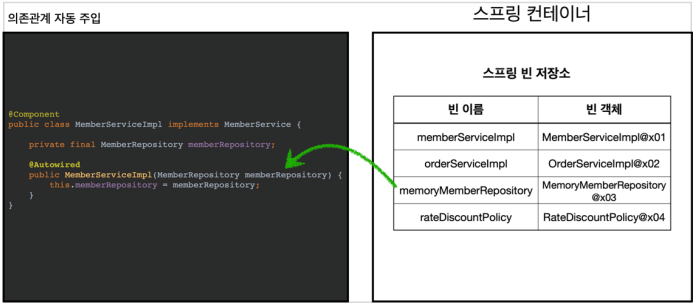
- 생성자에 @Autowired를 지정하면, 스프링 컨테이너가 자동으로 해당 스프링 빈을 찾아서 주입한다.
- 기본 조회 전략은 타입이 같은 빈을 찾아서 주입한다.
- getBean(MemberRepository.class)와 동일
📌탐색 위치와 기본 스캔 대상
💡탐색할 패키지의 시작 위치 지정
- 모든 자바 클래스를 다 컴포넌트 스캔하면 시간이 오래 걸림. 그래서 필요한 위치부터 탐색
@ComponentScan(
 		basePackages = "hello.core",
}- basePackages: 탐색할 패키지의 시작 위치지정. 이 패키지를 포함해 하위 패키지를 모두 탐색
- basePackageClasses: 지정한 클래스의 패키지를 탐색 시작 위치로 지정
- 지정하지 않으면 @ComponentScan이 붙은 설정 정보 클래스의 패키지가 시작 위치가 된다.
💡컴포넌트 스캔 기본 대상
- @Component: 컴포넌트 스캔에서 사용
- @Controller: 스프링 MVC 컨트롤러에서 사용
- @Service: 스프링 비지니스 로직에서 사용
- @Repository: 스프링 데이터 접근 계층에서 사용
- @Configuration: 스프링 설정 정보에서 사용
@Component
public @interface Controller {
}

@Component
public @interface Service {
}

@Component
public @interface Configuration {
}
참고: 애노테이션에는 상속관계라는 것이 없다. 애노테이션이 특정 애노테이션을 들고 있는 것을 인식할 수 있는 것은 자바가 아니고 스프링이 지원하는 기능이다.
애노테이션이 있으면 스프링은 부가 기능을 수행한다.
- @Controller: 스프링 MVC 컨트롤러로 인식
- @Repository: 스프링 데이터 접근 계층으로 인식하고, 데이터 계층의 예외를 스프링 예외로 변환해준다.
- @Configuration: 스프링 설정 정보로 인식하고, 스프링 빈이 싱글톤을 유지하도록 추가 처리를 한다.
- @Service: 핵심 비지니스 로직 (비지니스 계층을 인식하는데 도움이 된다)
📌필터
- includeFilters: 컴포넌트 스캔 대상을 추가로 지정한다.
- excludeFilters: 컴포넌트 스캔에서 제외할 대상을 지정한다.
💡컴포넌트 스캔 대상에 추가할 애노테이션
package hello.core.scan.filter;
import java.lang.annotation.*;

@Target(ElementType.TYPE)
@Retention(RetentionPolicy.RUNTIME)
@Documented
public @interface MyIncludeComponent {
}💡컴포넌트 스캔 대상에 제외할 애노테이션
package hello.core.scan.filter;
import java.lang.annotation.*;
@Target(ElementType.TYPE)
@Retention(RetentionPolicy.RUNTIME)
@Documented
public @interface MyExcludeComponent {
}💡컴포넌트 스캔 대상에 추가할 클래스
package hello.core.scan.filter;

@MyIncludeComponent
public class BeanA {
}- MyIncludeComponent 적용
💡컴포넌트 스캔 대상에서 제외할 클래스
package hello.core.scan.filter;

@MyExcludeComponent
public class BeanB {
}- MyExcludeComponent 적용
💡설정 정보와 전체 테스트 코드
package hello.core.scan.filter;
import org.junit.jupiter.api.Assertions;
import org.junit.jupiter.api.Test;
import org.springframework.beans.factory.NoSuchBeanDefinitionException;
import org.springframework.context.ApplicationContext;
import
org.springframework.context.annotation.AnnotationConfigApplicationContext;
import org.springframework.context.annotation.ComponentScan;
import org.springframework.context.annotation.Configuration;
import org.springframework.context.annotation.FilterType;
import static org.assertj.core.api.Assertions.assertThat;
import static org.springframework.context.annotation.ComponentScan.Filter;
public class ComponentFilterAppConfigTest {

    @Test
 	void filterScan() {
 		ApplicationContext ac = new
AnnotationConfigApplicationContext(ComponentFilterAppConfig.class);

        BeanA beanA = ac.getBean("beanA", BeanA.class);
 		assertThat(beanA).isNotNull();

        Assertions.assertThrows(
 				NoSuchBeanDefinitionException.class,
 				() -> ac.getBean("beanB", BeanB.class));
 }

 @Configuration
 @ComponentScan(
 			includeFilters = @Filter(type = FilterType.ANNOTATION, classes =
MyIncludeComponent.class),
 			excludeFilters = @Filter(type = FilterType.ANNOTATION, classes =
MyExcludeComponent.class)
 )
 static class ComponentFilterAppConfig {
 }
}
@ComponentScan(
includeFilters = @Filter(type = FilterType.ANNOTATION, classes =
MyIncludeComponent.class),
excludeFilters = @Filter(type = FilterType.ANNOTATION, classes =
MyExcludeComponent.class)
)- includeFilters에 MyIncludeComponent 애노테이션을 추가해서 BeanA가 스프링 빈에 등록된다.
- excludeFilters에 MyExcludeComponent 애노테이션을 추가해서 BeanB는 스프링 빈에 등록되지 않는다.
💡FilterType 옵션
- ANNOTATION: 기본값, 애노테이션을 인식해서 동작한다.
- ex) org.example.SomeAnnotation
- ASSIGNABLE_TYPE: 지정한 타입과 자식 타입을 인식해서 동작한다.
- ex) org.example.SomeClass
- ASPECTJ: AspectJ 패턴 사용
- ex) org\.example\.Default.*
- CUSTOM: TypeFilter이라는 인터페이스를 구현해서 처리
- ex) org.example.MyTypeFilter
📌중복 등록과 충돌
💡자동 빈 등록 vs 자동 빈 등록
- 컴포넌트 스캔에 의해 자동으로 스프링 빈이 등록되는데, 그 이름이 같은 경우 스프링은 오류를 발생시킨다.
- ConflictingBeanDefinitionException 예외 발생
💡수동 빈 등록 vs 자동 빈 등록
@Component
public class MemoryMemberRepository implements MemberRepository {}

@Configuration
@ComponentScan(
 		excludeFilters = @Filter(type = FilterType.ANNOTATION, classes =
Configuration.class)
)
public class AutoAppConfig {

    @Bean(name = "memoryMemberRepository")
 	public MemberRepository memberRepository() {
 		return new MemoryMemberRepository();
 	}
}- 수동 빈 등록이 우선권(수동빈이 자동빈을 오버라이딩 해버린다.)
💡수동 빈 등록시 남는 로그
Overriding bean definition for bean 'memoryMemberRepository' with a different
definition: replacing
💡수동 빈 등록, 자동 빈 등록 오류시 스프링 부트 에러
Consider renaming one of the beans or enabling overriding by setting
spring.main.allow-bean-definition-overriding=true'Web > spring' 카테고리의 다른 글
| Spring - [빈 생명주기 콜백] #8 (0) | 2022.08.29 |
|---|---|
| Spring - [의존관계 자동 주입] #7 (0) | 2022.08.27 |
| Spring -[싱글톤 컨테이너] #5 (0) | 2022.08.25 |
| Spring -[스프링 컨테이너와 스프링 빈 ] #4 (0) | 2022.08.18 |
| Spring -[스프링 핵심 원리 이해 2 - 객체 지향 원리 적용] #3 (0) | 2022.08.16 |
'Web/spring' Related Articles
more

